> ## Documentation Index
> Fetch the complete documentation index at: https://docs.tender.cash/llms.txt
> Use this file to discover all available pages before exploring further.
# Bulk Disbursements
> Pay multiple recipients at once using USDC or XLM on the Stellar network
Tender's disbursement feature lets you send funds to many recipients in a single action. Each
recipient receives an invitation to claim their payment directly into their Tender loyalty wallet.
 ***
## How it works
Collect each recipient's contact (email or phone), a unique ID, the amount, and their date of
birth for verification.
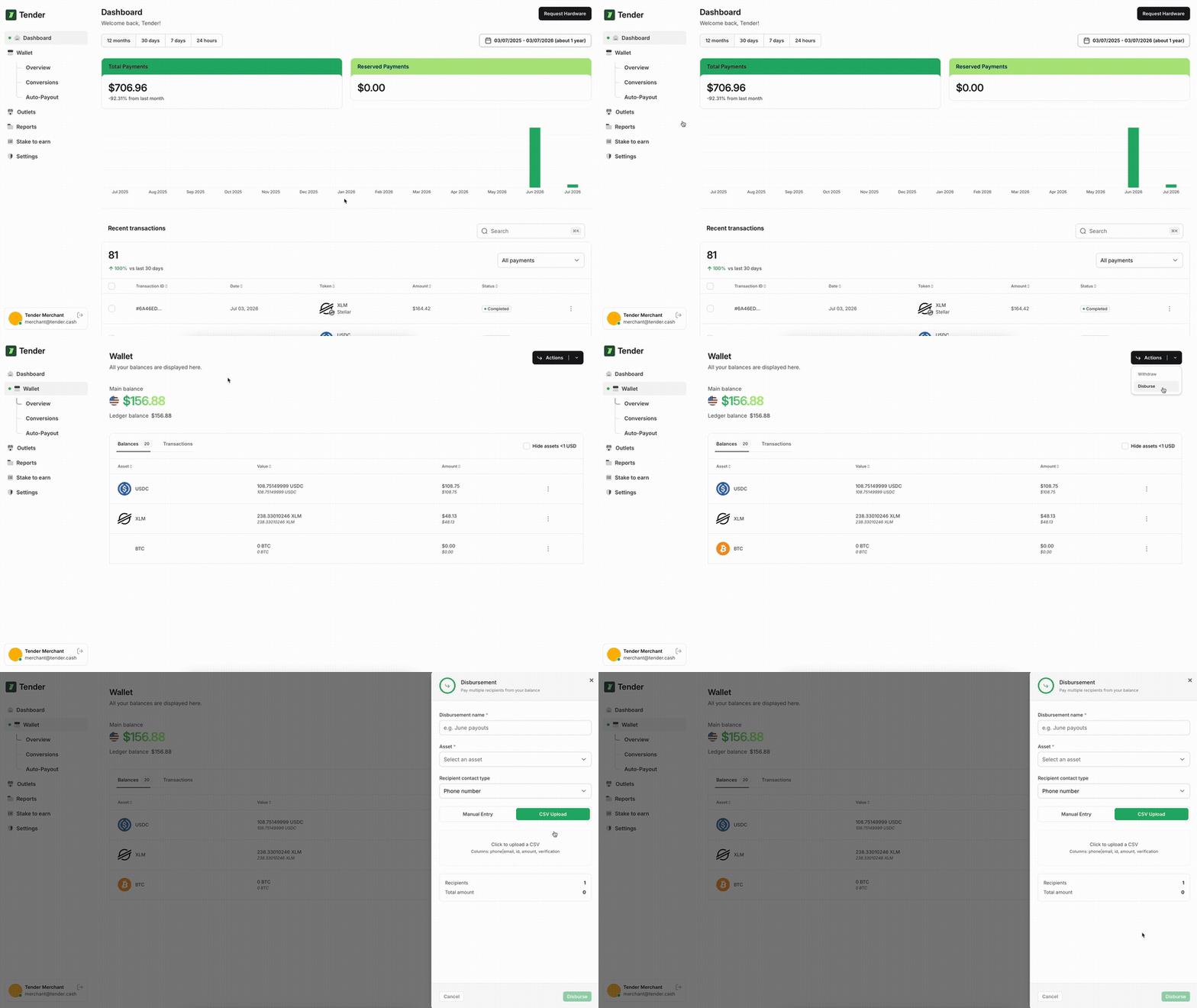
Go to **Wallet → Actions → Disburse** in your merchant dashboard, fill in the details, and
upload a CSV or enter recipients manually.
Tender debits your Stellar platform balance and transfers the total to the Stellar Disbursement
Platform distribution account on-chain.
Each recipient receives an invitation via email or SMS. They click the link, verify their
identity, and funds are credited to their Tender loyalty wallet.
***
## Prerequisites
Your merchant account must be fully KYC verified before you can disburse.
You must hold the asset you want to disburse (USDC or XLM) in your Tender platform wallet.
The full total is debited at submission time.
***
## Supported assets
| Asset | Network | Notes |
| ----- | ------- | ----------------------------------------------------------- |
| USDC | Stellar | Settled to recipient's Tender loyalty wallet |
| XLM | Stellar | Native asset — settled to recipient's Tender loyalty wallet |
***
## CSV format
Upload a `.csv` file with the following columns:
```csv theme={null}
contact,id,amount,verification
alice@example.com,cust-001,10.00,1990-05-20
bob@example.com,cust-002,25.50,1985-11-03
+2348012345678,cust-003,5.00,1992-08-14
```
| Column | Type | Description |
| -------------- | ------ | ---------------------------------------------------------------------------- |
| `contact` | string | Recipient email address or phone number (E.164 format for phone) |
| `id` | string | Your internal ID for this recipient — must be unique within the disbursement |
| `amount` | number | Amount to send (e.g. `10.00`) |
| `verification` | string | Recipient's date of birth in `YYYY-MM-DD` — must match exactly at claim time |
The `verification` date of birth must match exactly what the recipient enters when they claim
their funds. A mismatch will block the payment.
### Rules
* Each `id` must be unique within the disbursement
* Minimum amount: `0.0000001` (Stellar precision)
* Maximum recipients per disbursement: **10,000**
* Disbursement `name` must be globally unique — plan a naming convention such as `payroll-2026-06`
***
## Disbursement statuses
### Disbursement-level
| Status | Meaning |
| ------------- | ------------------------------------ |
| `STARTED` | Accepted — payments are being queued |
| `IN_PROGRESS` | Some recipients paid, others pending |
| `COMPLETED` | All recipients paid |
| `PAUSED` | Manually paused |
### Per-recipient payment status
| Status | Meaning |
| --------- | ---------------------------------------------------- |
| `READY` | Queued, waiting for recipient to register and verify |
| `PENDING` | Submitted to the Stellar network |
| `SUCCESS` | Funds landed in recipient's Tender loyalty wallet |
| `FAILED` | Payment failed — will retry automatically |
***
## Troubleshooting
Your Stellar platform balance is below the disbursement total. Top up via your wallet page
and retry.
A disbursement with that exact name was already submitted. Use a different, unique name.
The date of birth in your CSV doesn't match what the recipient entered at registration.
Confirm the correct date and resubmit with an updated record.
Check whether they completed registration — they need to click the link in their email or SMS
invitation. Unregistered recipients stay in `READY` state until they do.
Your platform wallet has no Stellar USDC. Either switch to XLM or deposit USDC to your
Tender Stellar wallet first.
***
## FAQ
Funds are credited to the recipient's Tender loyalty wallet. Recipients without an account
will be guided through a short setup flow when they click their invitation link.
Disbursements can be paused before all payments are processed. Already-sent payments cannot
be reversed — Stellar transactions are final.
Up to 10,000 recipients per disbursement. For larger campaigns, split across multiple
disbursements.
The payment stays in `READY` state indefinitely until the recipient completes their
registration and identity verification via the invitation link.
***
## How it works
Collect each recipient's contact (email or phone), a unique ID, the amount, and their date of
birth for verification.
Go to **Wallet → Actions → Disburse** in your merchant dashboard, fill in the details, and
upload a CSV or enter recipients manually.
Tender debits your Stellar platform balance and transfers the total to the Stellar Disbursement
Platform distribution account on-chain.
Each recipient receives an invitation via email or SMS. They click the link, verify their
identity, and funds are credited to their Tender loyalty wallet.
***
## Prerequisites
Your merchant account must be fully KYC verified before you can disburse.
You must hold the asset you want to disburse (USDC or XLM) in your Tender platform wallet.
The full total is debited at submission time.
***
## Supported assets
| Asset | Network | Notes |
| ----- | ------- | ----------------------------------------------------------- |
| USDC | Stellar | Settled to recipient's Tender loyalty wallet |
| XLM | Stellar | Native asset — settled to recipient's Tender loyalty wallet |
***
## CSV format
Upload a `.csv` file with the following columns:
```csv theme={null}
contact,id,amount,verification
alice@example.com,cust-001,10.00,1990-05-20
bob@example.com,cust-002,25.50,1985-11-03
+2348012345678,cust-003,5.00,1992-08-14
```
| Column | Type | Description |
| -------------- | ------ | ---------------------------------------------------------------------------- |
| `contact` | string | Recipient email address or phone number (E.164 format for phone) |
| `id` | string | Your internal ID for this recipient — must be unique within the disbursement |
| `amount` | number | Amount to send (e.g. `10.00`) |
| `verification` | string | Recipient's date of birth in `YYYY-MM-DD` — must match exactly at claim time |
The `verification` date of birth must match exactly what the recipient enters when they claim
their funds. A mismatch will block the payment.
### Rules
* Each `id` must be unique within the disbursement
* Minimum amount: `0.0000001` (Stellar precision)
* Maximum recipients per disbursement: **10,000**
* Disbursement `name` must be globally unique — plan a naming convention such as `payroll-2026-06`
***
## Disbursement statuses
### Disbursement-level
| Status | Meaning |
| ------------- | ------------------------------------ |
| `STARTED` | Accepted — payments are being queued |
| `IN_PROGRESS` | Some recipients paid, others pending |
| `COMPLETED` | All recipients paid |
| `PAUSED` | Manually paused |
### Per-recipient payment status
| Status | Meaning |
| --------- | ---------------------------------------------------- |
| `READY` | Queued, waiting for recipient to register and verify |
| `PENDING` | Submitted to the Stellar network |
| `SUCCESS` | Funds landed in recipient's Tender loyalty wallet |
| `FAILED` | Payment failed — will retry automatically |
***
## Troubleshooting
Your Stellar platform balance is below the disbursement total. Top up via your wallet page
and retry.
A disbursement with that exact name was already submitted. Use a different, unique name.
The date of birth in your CSV doesn't match what the recipient entered at registration.
Confirm the correct date and resubmit with an updated record.
Check whether they completed registration — they need to click the link in their email or SMS
invitation. Unregistered recipients stay in `READY` state until they do.
Your platform wallet has no Stellar USDC. Either switch to XLM or deposit USDC to your
Tender Stellar wallet first.
***
## FAQ
Funds are credited to the recipient's Tender loyalty wallet. Recipients without an account
will be guided through a short setup flow when they click their invitation link.
Disbursements can be paused before all payments are processed. Already-sent payments cannot
be reversed — Stellar transactions are final.
Up to 10,000 recipients per disbursement. For larger campaigns, split across multiple
disbursements.
The payment stays in `READY` state indefinitely until the recipient completes their
registration and identity verification via the invitation link.